Paste a YouTube link.
It lands in your Premiere project.

A free, open-source panel for Premiere Pro on macOS. Built in an hour for a photographer friend who refuses to touch a terminal, then hardened so he never has to.

v1.0.0 · MIT · Premiere Pro 2020–2025 · Apple Silicon & Intel

ClipShuttle Effects Essential Sound
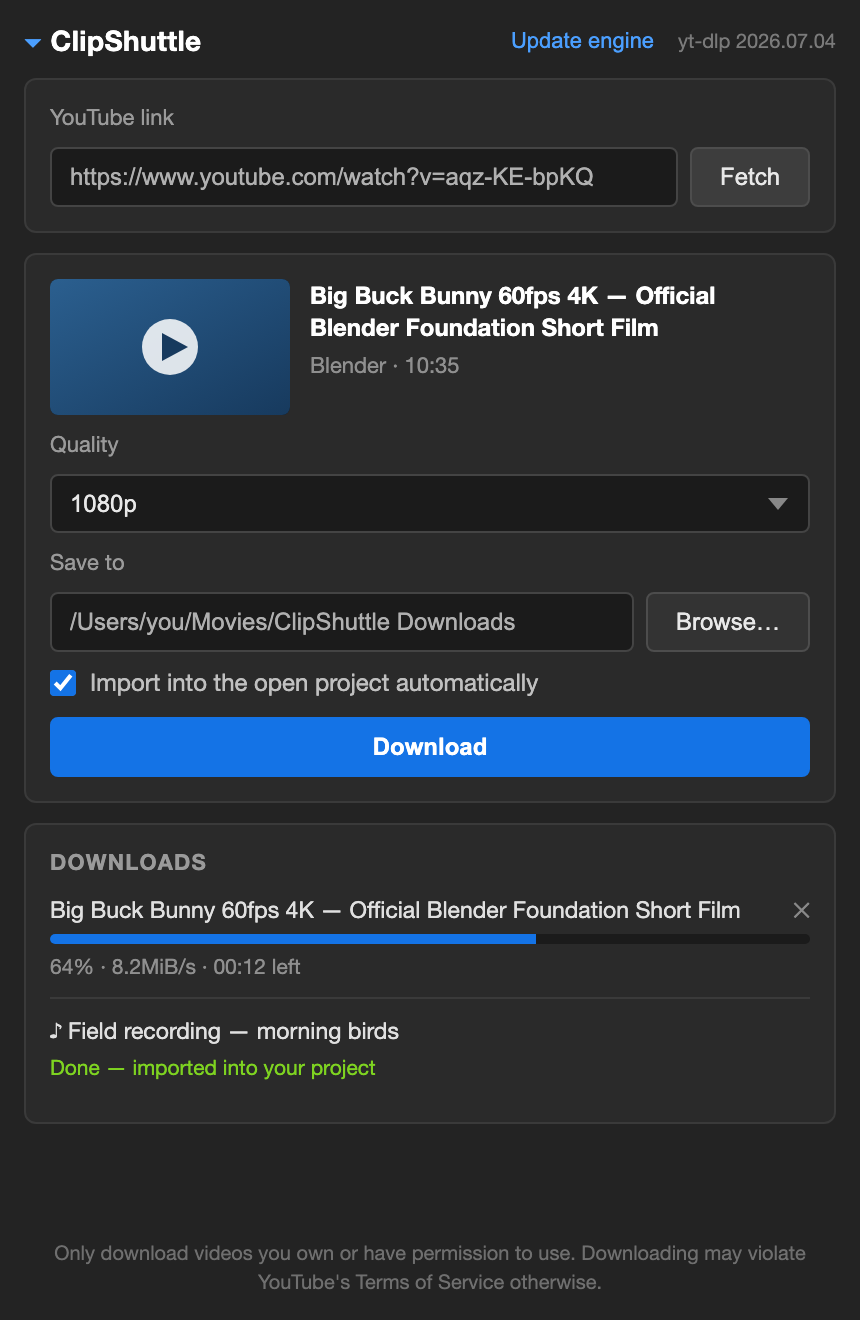
The ClipShuttle panel inside Premiere Pro: a pasted YouTube link, a quality menu offering 4K down to 360p, and a download in progress at 64%

It started with a phone call

"I keep seeing this plugin on Instagram. You paste a YouTube link and the video just appears inside Premiere. Can you build me one? I'll mess it up if I have to use the terminal."

He shoots weddings. He is not a coder; his idea of a build pipeline is a coffee machine. So the whole thing was designed backwards from one constraint: he will never read an error log, never open Terminal, never Google a codec.

The download part took an hour. The rest went into everything that could possibly go wrong for him: YouTube's codecs that Premiere can't open, macOS security prompts, region locks, YouTube changing their internals every other week. All of it either handled automatically or explained in plain English.

"Wait, that's it?" first words after the one-double-click install

Three steps, no terminal

Paste a link

Copy any YouTube URL and paste it in the panel. It fetches the title, thumbnail, and every quality that video actually offers, from 4K to audio-only MP3. Vertical videos and Shorts included.

Pick a quality

Qualities that need conversion say so up front. Anything above 1080p gets converted automatically, because YouTube serves those in codecs Premiere can't decode.

It lands in your bin

The clip downloads with live progress, gets checked frame-format by frame-format, and imports straight into your open project. Queue several; they run one by one.

The download is the easy 20%

The other 80% is what makes it safe to hand to someone who will never debug anything. Every file that reaches Premiere has been probed and, if needed, converted, so there is no such thing as a clip that won't open.

Premiere-safe output, always
Every download is codec-probed with FFmpeg. Anything that isn't H.264 + AAC in an MP4 gets converted before import. VP9 and AV1 never reach your timeline.
One-double-click installer
Copies the panel, fetches its own tools, verifies they actually run, and registers with Premiere. Re-running it repairs a broken install and skips what already works.
Self-updating engine
YouTube changes things constantly. When a download fails, one click updates yt-dlp and you try again. No reinstall, no new zip.
Plain-English errors
Age-restricted, private, region-blocked, live stream, playlist link: each gets a sentence a human can act on, not a stack trace.
Made for real footage
Vertical videos and Shorts keep their true resolution. 60fps stays 60fps. HDR sources are converted to 8-bit so older Premiere versions behave.
Open source, no strings
MIT licensed, every line on GitHub. No account, no telemetry, no Pro tier. It downloads its tools from their official releases and nothing else.

Installed in about two minutes

  1. 01Download the zip and unzip it somewhere permanent, like Documents.
  2. 02Double-click "Install ClipShuttle.command". It fetches its tools (~100 MB, one time) and says Done! 🎉
  3. 03Restart Premiere Pro, open a project, then Window → Extensions → ClipShuttle.

If macOS blocks the installer: click Done (not "Move to Trash"), then open System Settings → Privacy & Security and click Open Anyway. That's Apple's standard flow for apps from outside the App Store; you do it once.

On older macOS: right-click the installer, choose Open, then Open again.

requires · macOS 11+ · Premiere Pro 2020–2025
tools fetched at install · yt-dlp + FFmpeg + Deno

Use it on footage you have the right to use

Downloading videos can violate YouTube's Terms of Service unless the content is yours, you have the creator's permission, or the license allows it (Creative Commons, your own published channel, licensed stock). ClipShuttle is a neutral tool, the same category as yt-dlp; what you download with it is your call and your responsibility.

Built for one friend.
Shared for everyone else's friend.

free · open source · no account, no telemetry